Table of Contents
What is the Oracle Fusion Setup and Configuration Registry?
How Does FSCR Change a Traditional Fusion Implementation?
What Do the FSCR Skills Cover for Oracle Fusion ERP for Banking?
How Do You Set Up FSCR in Codex? The Easiest Path
How Does Human Approval Work in FSCR?
What Evidence Does FSCR Leave for Auditors?
Sample Codex Prompts for a Bank Finance Implementation?
How Does FSCR Add Value to Each Banking Department?
What Should Bank’s Watch Before Using FSCR?
How AppsTek Helps Bank Adopts FSCR
What’s Next for AI-driven Fusion Setup in Banking?


KEY TAKEAWAYS
- FSCR is a structured repository, not a chatbot. Router, core, shared, and pillar skills tell Codex exactly which Fusion task to run, in what order, and with which checks.
- Real ERP Finance coverage exists today, including legal structures, chart of accounts, ledgers, Payables, Payments, and Procurement approval setup.
- Approval is built into the workflow. Codex can’t submit a change until you’ve seen the exact environment, operation, and file, and said yes
- It’s free, open-source reference material, not a supported product. Banks need their own controls around environments, rollback, and data handling.
What is the Oracle Fusion Setup and Configuration Registry?
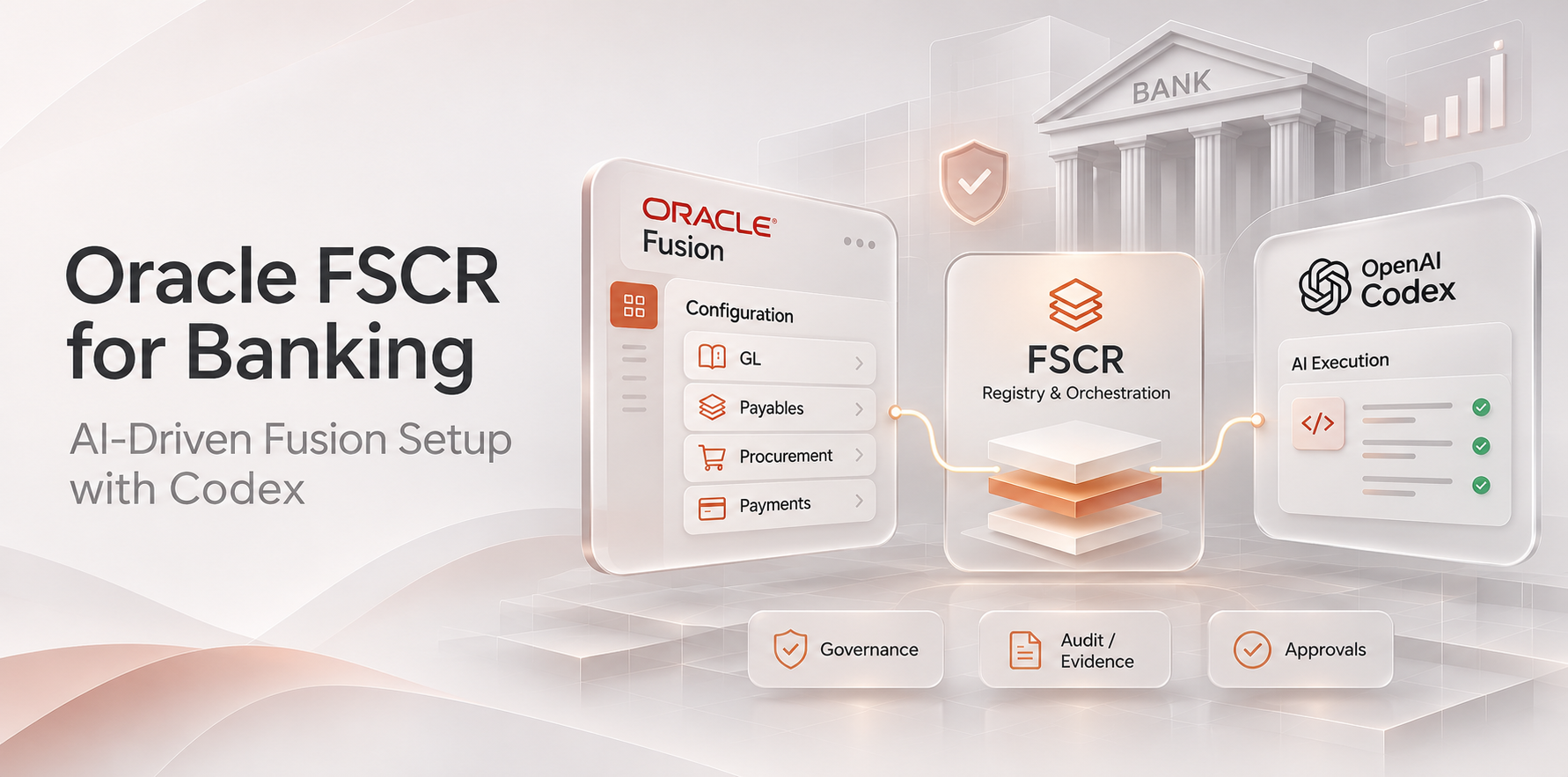
FSCR packages Oracle’s own setup knowledge as machine-readable skills. Each skill is a folder with a SKILL.md manifest that declares its inputs, outputs, dependencies, execution mode, and required privileges. Oracle maintains the registry alongside each Fusion release and publishes it under the Universal Permissive License (UPL) 1.0.
Open the repository and you’ll find eight layers. Understanding them makes the rest of this blog easier to follow:
| Layer | What it does |
|---|---|
| Router | Entry point. Classifies your objective (for example, “set up Payables for two business units”) and decides which skills run next. |
| Core | Technical services: OAuth authentication, REST clients, ESS job submission, setup export and import, FBDI, HDL, Data Loader, Run Book, and diagnostics. |
| Shared | Cross-module methodology: project intake, planning, baseline assessment, validation, data conversion, and reporting. |
| Pillars | Module-specific skills for ERP, HCM, SCM, and CX, owned by Oracle’s product teams. |
| Knowledge | Setup task catalogs, dependency graphs, validation rules, and product guidance. |
| Schemas | Machine-readable contracts for skill manifests and project artifacts. |
| Governance | Contribution standards, naming conventions, and review checklists. |
| Project | Your local workspace. It stores plans, decisions, exports, baselines, and run history so work can resume across sessions. |
Each skill also declares one of four execution modes: advisory (guidance you run yourself), assisted (generates artifacts for human review), automated (performs approved actions through APIs, loaders, or jobs), or hybrid (automated preparation plus human approval). That label tells your team up front how much the agent will do on its own.
How does FSCR change a traditional Fusion implementation?
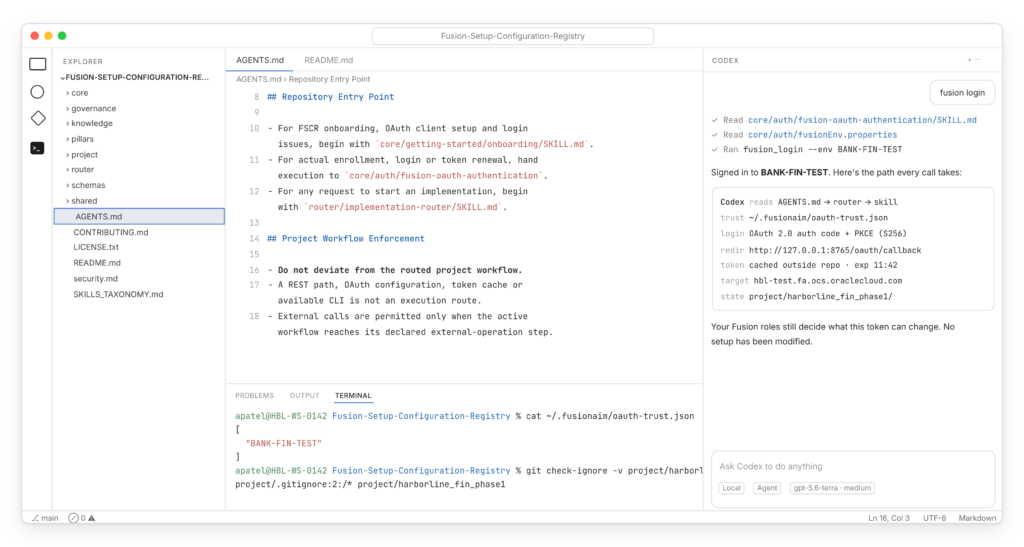
In a traditional implementation, consultants read requirements, look up the matching task in Setup and Maintenance, enter values screen by screen or prepare FBDI and HDL templates by hand, and track progress in spreadsheets. FSCR doesn’t remove the consultant. It removes the translation and re-keying layer between the design and the system.
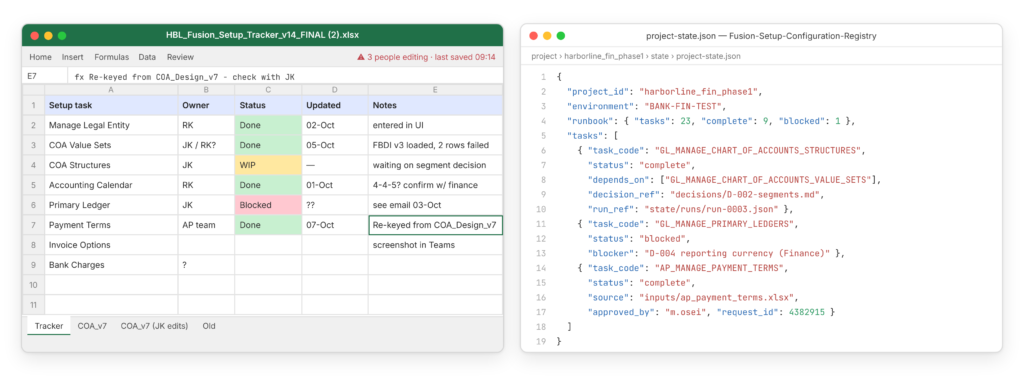
Harborline Bank story: Throughout this blog, we’ll follow Harborline Bank, a fictional bank piloting FSCR for its Fusion General Ledger and Payables rollout. Its finance, AP, IT, security, and audit teams all have a part to play.
What do the FSCR skills cover for Oracle Fusion ERP for banking?
Banks don’t run core banking on Fusion, but most run finance, procurement, and HR on it. Here’s what we found in the ERP Financials and Procurement pillars of the public repository:
| Area | Example skills in the repository |
|---|---|
| Legal structures | Legal entities, jurisdictions, legal reporting units, registrations, legal addresses |
| Financial reporting structures | Chart of accounts value sets and values, structures, structure instances, account combinations, accounting calendars, COA mappings |
| General Ledger | Primary and secondary ledgers, ledger options, reporting currencies, ledger sets, balancing segment assignments, review and submit accounting configuration |
| Payables | Payment terms, invoice options, payment options, Payables calendars, bank charges, common options for Payables and Procurement |
| Payments | Disbursement system options, payment systems, formats, payment codes |
| Procurement (SCM pillar) | Procurement and requisitioning business functions, procurement agents, document numbering and styles, purchasing document approvals, supplier registration approvals |
| Security and risk | Job roles, duties, data security policies, data access for users, and a risk-and-security area for access controls |
Here’s what that looks like inside the repository, including the manifest for the Payables “Manage Payment Terms” skill:
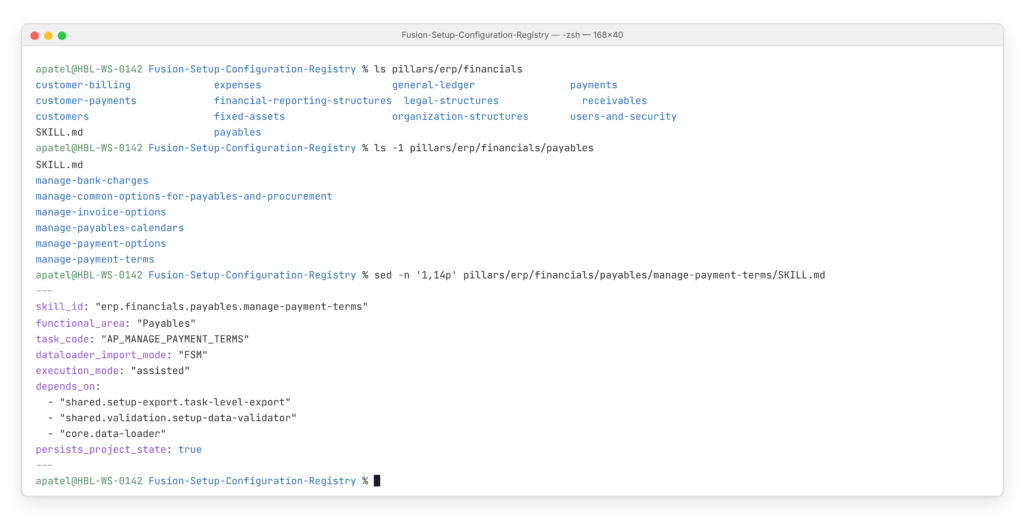
Notice the task code ties directly to the Fusion setup task, and the dependencies tell Codex to export and validate setup data before loading anything. That’s the kind of discipline a bank’s change board wants to see.
Coverage varies by skill and changes with every release. Always check the repository for the workflows you plan to use before committing them to a project plan.
How do you set up FSCR in Codex? The easiest path
You need three things: a Fusion test environment on the right release, an Identity Domain administrator for one-time OAuth setup, and Codex on a machine that meets your bank’s security standards. Here’s the shortest path.
Harborline Bank story: Harborline’s IT lead blocked out one morning for setup. The only outside dependency was the Identity Domain administrator, who needed about an hour to create the OAuth client.
Step 1: Confirm the release and enable FSCR
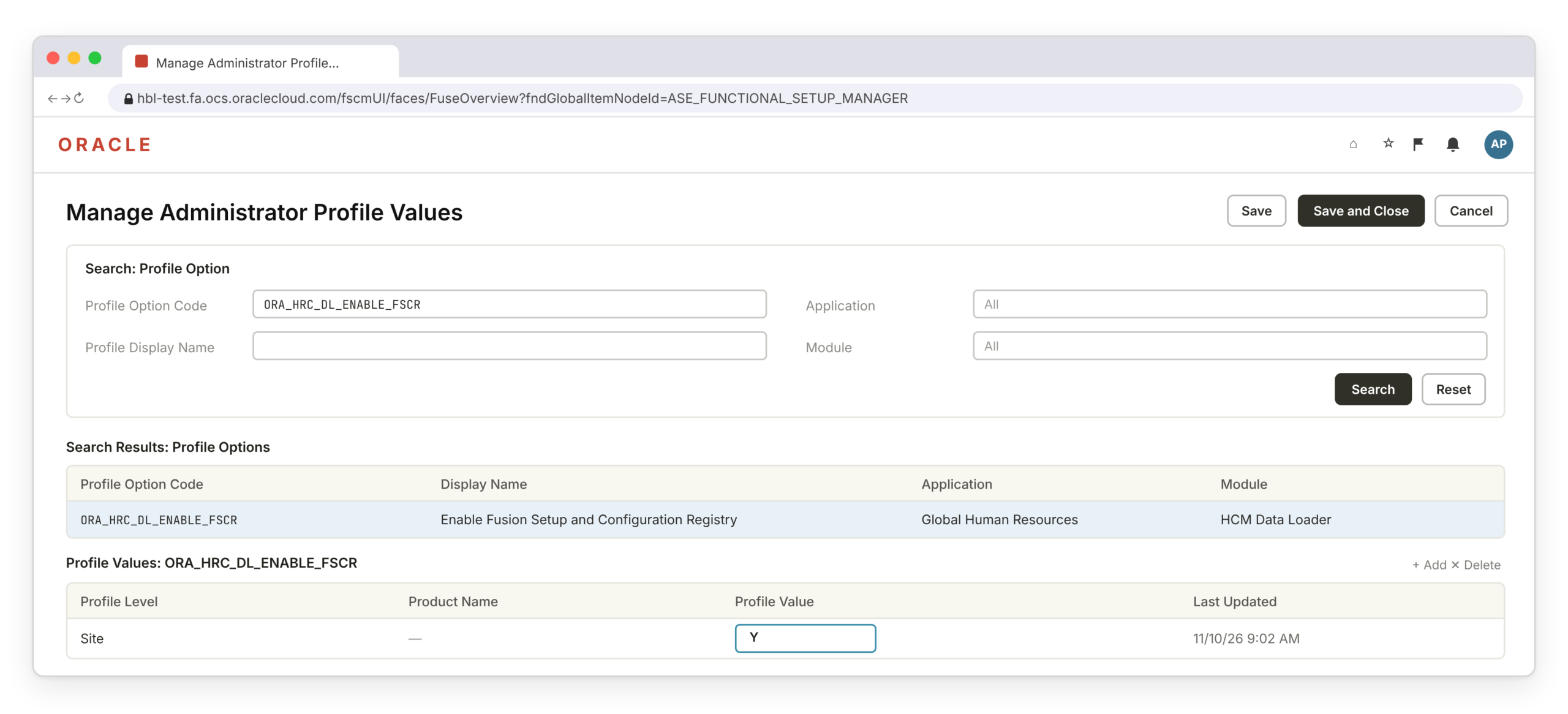
Your environment must run Fusion Release 26D with the Weekly Maintenance Pack named in the FSCR README (the 16 October 2026 pack at the time of writing, per both the README and Oracle’s 26D What’s New) or later. Then set the profile option ORA_HRC_DL_ENABLE_FSCR to Y, typically through the Manage Administrator Profile Values task in Setup and Maintenance.
Step 2: Clone the repository
git clone https://github.com/oracle/Fusion-Setup-Configuration-Registry.git
cd Fusion-Setup-Configuration-Registry
python3 –version # 3.11 or 3.12 recommended; 3.10 minimum
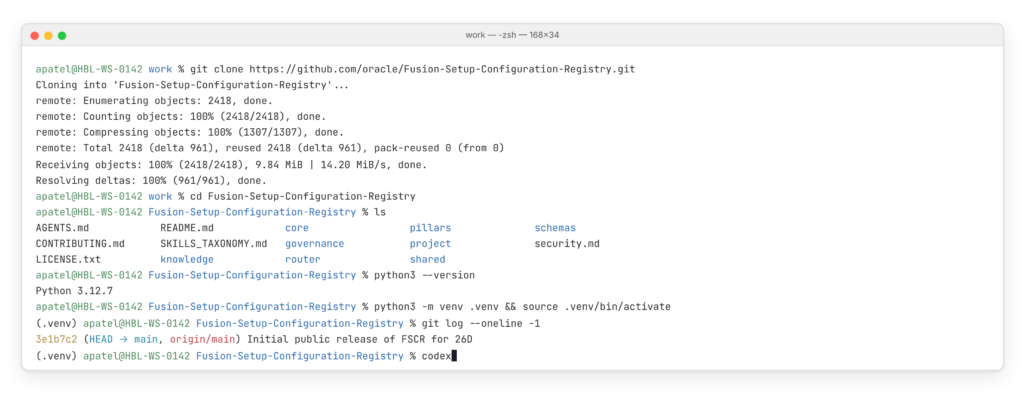
Python matters because FSCR’s automation scripts (Data Loader, Run Book, validators) run locally and use modern Python syntax. Version 3.9 or older won’t work.
Step 3: Open the folder in Codex
Launch Codex from inside the cloned folder, either by running codex in the terminal or by opening the folder in the Codex app or IDE extension. This is the step that makes the whole thing work: Codex reads the repository’s AGENTS.md file automatically. That file is FSCR’s rulebook for the agent. It tells Codex where to start, forbids shortcuts like direct REST calls outside the workflow, and requires explicit approval before any change.
Model choice matters too. The README notes FSCR was tested with OpenAI’s GPT 5.6 Terra Medium model and says results vary by model, so pick one with strong reasoning for planning work.
Harborline Bank story: Harborline’s finance systems analyst had never used a coding agent before. She opened the cloned folder in Codex and simply typed what she wanted to know, the same way she’d ask a colleague.
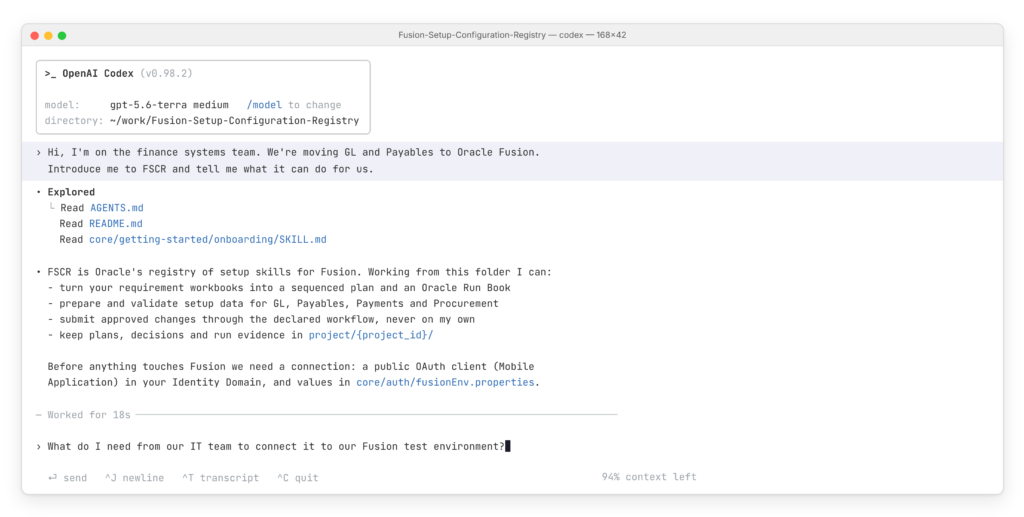
You don’t need special commands. Codex reads the repository’s files on its own (the highlighted files in the sidebar) and answers in plain language. The repository does the heavy lifting; you just describe what you need.
Step 4: Create the OAuth client (one-time)
An Identity Domain administrator creates a public OAuth client of type Mobile Application, adds the callback URL and required resource scopes, activates it, and shares the Client ID. No client secret is involved; FSCR uses PKCE, which suits a desktop agent that shouldn’t hold secrets. If you’re unsure, ask Codex “Help me connect FSCR to my Fusion environment” and the onboarding skill walks you through it with diagrams.
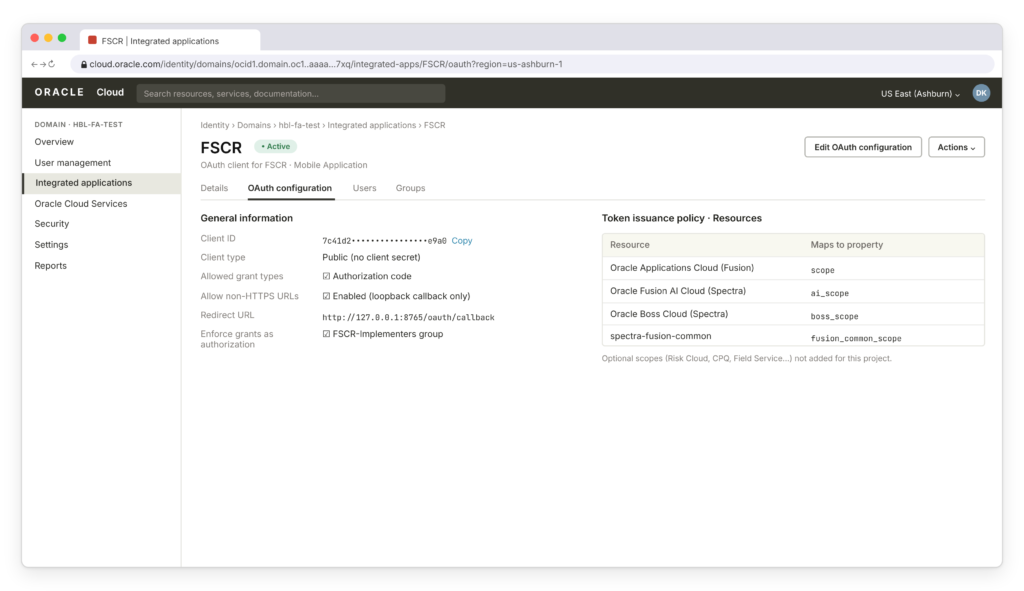
Step 5: Fill in fusionEnv.properties
Configure core/auth/fusionEnv.properties with your environment details. Here’s the template filled in for a bank test environment:
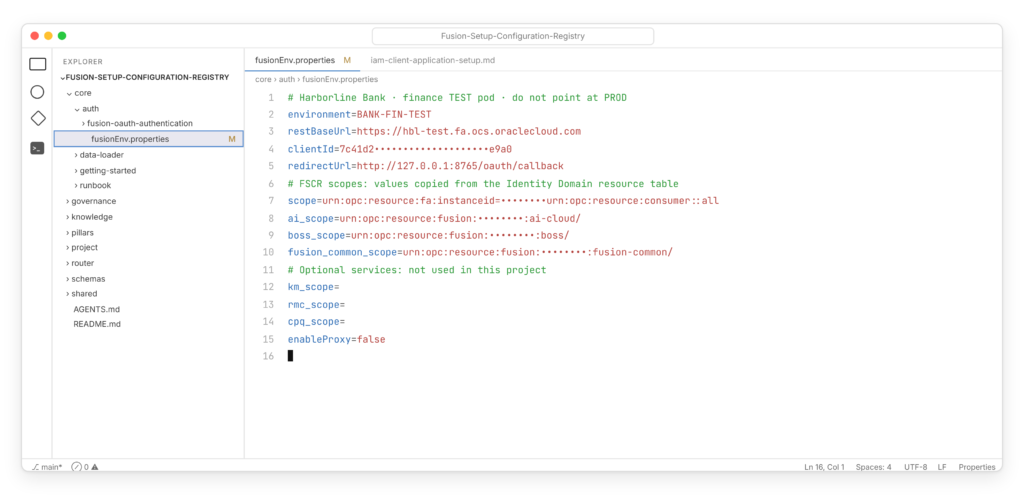
Name the environment clearly (for example, BANK-FIN-TEST). FSCR won’t tell test from production for you, so the name is your first safeguard.
Step 6: Enroll trust and log in
Codex runs the Fusion OAuth Authentication skill. It records a private trust policy in your home directory (outside the repository), opens a browser for you to sign in, and caches the access token outside the repo until it expires. Your Fusion roles and data access still decide what you can actually change.
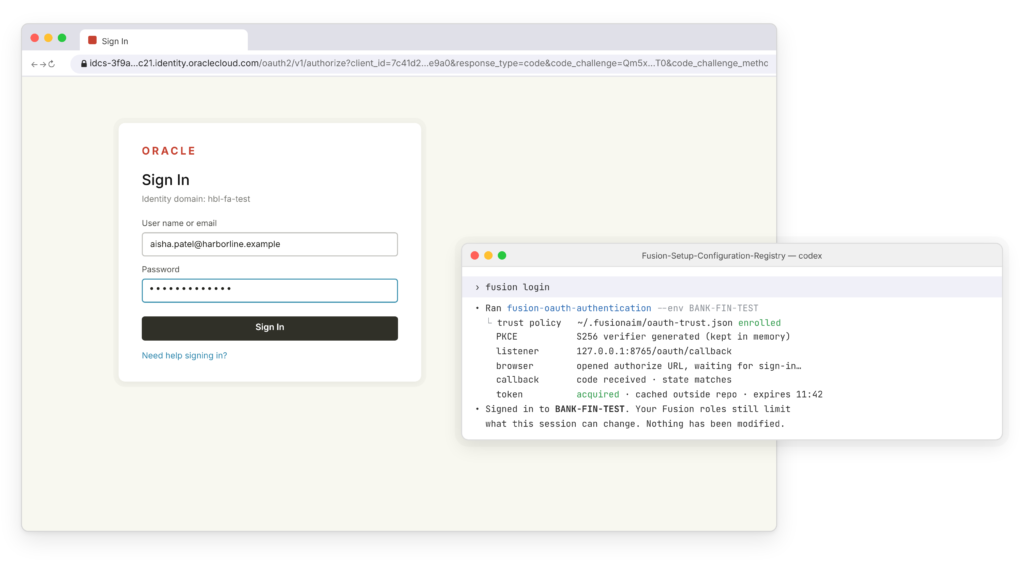
Step 7: Start your first project
Type your goal in plain language. The implementation router creates a project workspace from the template (named like draft_impl_project_<date>), runs prevalidation to check environment readiness, and creates an Oracle Run Book with your tasks. The router won’t send any change to Fusion until that Run Book is active.
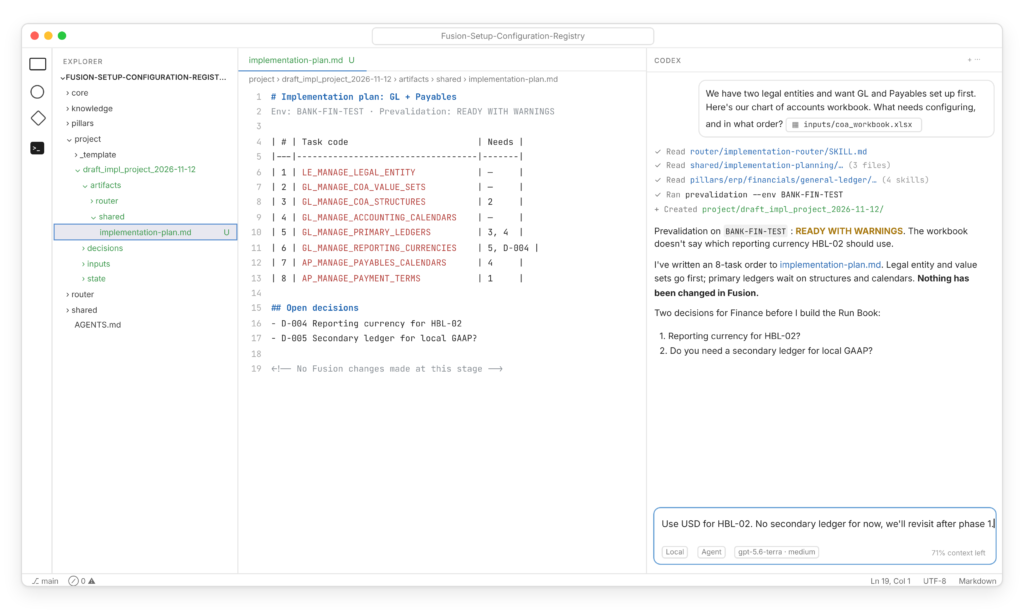
Notice what Codex didn’t do: it didn’t change anything in Fusion. It proposed a sequence, flagged a missing requirement, and asked two design questions the finance team must answer.
How does human approval work in FSCR?
This is the part bank risk teams will care about most, and it’s stricter than many people expect. These are points to look at:
- Plan approval does not authorize changes: Approving a Run Book or mapping does not authorize Codex to make changes in Fusion.
- Validation precedes approval requests: For a data load, Codex converts the file, maps every column to live Fusion attributes, checks schema and task rules, and freezes the result as an immutable upload file. If any rule fails, Codex reports a finding instead of requesting approval.
- Approval covers the exact file being submitted: The approval report identifies the target environment, operation, and specific file. Once approval is granted, Codex uploads those exact bytes without re-conversion.
- Any change restarts the approval cycle: Changes to the source, mapping, or file trigger validation and approval again.
- Failures halt execution: Codex does not retry a create, update, delete, or load operation without approval. It records the error class, request ID, and next step in the project folder.
What evidence does FSCR leave for auditors?
Every project lives in project/{project_id}/ on the machine running Codex. It’s organized so an auditor or a support team can follow what happened:
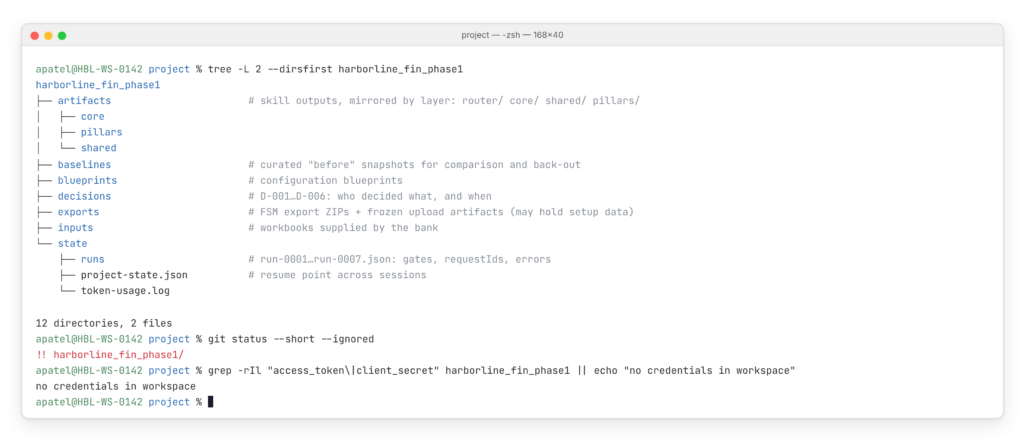
Harborline Bank story: At the end of the pilot, Harborline’s internal audit team reviewed the decisions folder and run records instead of asking consultants to reconstruct what happened.
A few built-in rules help with data protection. Credentials, tokens, and keys are never stored in the repository or workspace. Project folders are git-ignored by default, so exports aren’t pushed by accident. Diagnostics are redacted. That said, exports can contain real setup data, so the laptop or virtual desktop running Codex needs the same controls as any device holding finance configuration.
Sample Codex prompts for a bank finance implementation
These show what Codex Oracle Fusion configuration looks like day to day. Results depend on the skills in your release.
Getting started
for our bank’s two legal entities.
Planning
anything missing.
secondary ledgers?
Execution with control
until I approve.
Validation and evidence
implementation plan.
How does FSCR add value to each banking department?
A Bank’s Fusion project pulls in far more people than the finance team. Here’s how FSCR changes the work for each group, and what each still needs to own:
| Department | How FSCR helps | What they still own |
|---|---|---|
| Finance and Controllership | Sees COA, ledger, and calendar design mapped to tasks early, with dependencies explained in plain language. | Approving the accounting design and reporting currency choices. |
| Accounts Payable and Treasury Operations | Payment terms, invoice options, payment methods, and bank charges are validated before loading, so issues surface in design, not UAT. | Payment controls, disbursement rules, and approval thresholds. |
| Procurement | Business functions, agents, and approval rules are configured from the delegation-of-authority matrix in a repeatable way. | Matching approval hierarchies to the bank’s authority limits. |
| IT and Enterprise Architecture | Gets a versioned, scripted setup process instead of screenshots and spreadsheets, plus baselines for future updates. | Environment strategy, Codex deployment, and integration with core banking. |
| Information Security and IAM | OAuth with PKCE, no stored secrets, scoped tokens, and Fusion roles enforced on every call. | OAuth client setup, least-privilege roles, and segregation of duties. |
| Internal Audit and Compliance | Decisions, approvals, run records, and validation reports are captured as the work happens. | Defining what evidence is required and reviewing it. |
| Risk (third-party and AI risk) | Clear documentation of what the agent can and can’t do, and the approval gates it follows. | Assessing FSCR and Codex under vendor and AI governance policies. |
| PMO | Run Book dashboards show task status and blockers without chasing consultants. | Scope, timelines, and stakeholder sign-offs. |
The shared benefit is a single source of truth. Instead of each department working from its own spreadsheet version, everyone reviews the same plan, decisions, and evidence.
What should bank’s watch before using FSCR?
Oracle is upfront about FSCR’s limits. Treat each one as a control you need to design:
- FSCR is not a supported product: FSCR is not a Fusion Cloud feature and is not covered by Fusion product support. Report FSCR defects through GitHub Issues, while Fusion product issues must go through Oracle Support.
- Rollback is unavailable: Plan your own back-out steps and capture configuration baselines before making changes.
- Environment identification is manual: Use separate OAuth clients and clearly named environments for testing and production. Follow the standard production change process.
- Acceptance does not mean completion: An accepted data load does not indicate that Fusion has finished processing it. Check the processing status and errors separately.
- Configuration coverage is partial: FSCR does not configure an entire implementation. Some tasks must still be completed through conventional methods.
- Versions change frequently: Required maintenance packs may change between FSCR updates. Always review the README before starting.
- Data remains local: Exports and artifacts are stored on the Codex machine. Review the AI policy to determine which data can be shared with Codex and where workspaces can be stored.
- People remain accountable: Consultants are responsible for reviewing requirements, approving changes, and verifying the final configuration.
How AppsTek helps banks adopt FSCR
FSCR gives banks a strong technical foundation. Making it safe and useful in a regulated environment takes design work around it:
- Readiness and setup: We check release level, enable the profile option, set up OAuth clients per environment, and configure Codex on approved infrastructure.
- Governance design: We define approval policies (including banning auto-approve), environment separation, workspace storage, and evidence retention mapped to your change and audit processes.
- Requirements to Run Book: We prepare clean GL, Payables, Payments, and Procurement workbooks and lead Codex-guided planning sessions with your finance team.
- Pilots and gap coverage: We start with a narrow scope in test, and where published skills don’t cover a task, we configure it conventionally or build on FSCR’s open foundation.
What’s next for AI-driven Fusion setup in banking?
FSCR is only weeks old, but the direction is clear: Fusion setup is moving from manual configuration to agent-assisted, approval-gated execution with evidence built in. Banks that pilot it now, with the right controls, will be ready to use it for larger rollouts as Oracle expands coverage.
Ready to pilot FSCR at your bank? Talk to AppsTek’s Oracle Fusion experts about a readiness assessment and a controlled Codex pilot.
Frequently Asked Questions
It’s a public GitHub repository from Oracle that packages Fusion setup knowledge as AI skills. Coding agents like Codex use it to plan, execute, test, and validate setup tasks in Oracle Fusion Cloud Applications.
Enable the ORA_HRC_DL_ENABLE_FSCR profile option, clone the repository, open the folder in Codex, configure a public OAuth client and fusionEnv.properties, then log in and describe your goal in plain language.
Not through the standard workflow. Codex must validate the change and show you the exact environment, operation, and file before you approve submission.
Yes. The repository includes skills for legal structures, chart of accounts, ledgers, Payables, Payments, and Procurement, though coverage varies by task and release.
No. It’s sample and reference material under the UPL 1.0 license and isn’t covered by Fusion Cloud product support.